概要
Infrastructure as Codeを実現- プロビジョニングツール
参考ドキュメント
- テンプレート リファレンス
https://docs.aws.amazon.com/AWSCloudFormation/latest/UserGuide/template-guide.html - API リファレンス(HTTP API リファレンス)
https://docs.aws.amazon.com/ja_jp/AWSCloudFormation/latest/APIReference/Welcome.html - AWS CLI リファレンス (API リファレンスのCLI版)
https://docs.aws.amazon.com/ja_jp/cli/latest/reference/cloudformation/index.html
CloudFormationの概要を把握する資料。
- https://d1.awsstatic.com/webinars/jp/pdf/services/20200826_AWS-BlackBelt_AWS-CloudFormation.pdf
Coudformation テンプレート
CloudFormation はテンプレートをアップロードしてスタックを作成します。
CloudFormation テンプレートの詳細は以下を参照してください。
ref. https://docs.aws.amazon.com/AWSCloudFormation/latest/UserGuide/template-guide.html
ルート定義済みプロパティ
https://docs.aws.amazon.com/ja_jp/AWSCloudFormation/latest/UserGuide/template-anatomy.html
AWSTemplateFormatVersion: "version date"

Description:
  String

Metadata:
  template metadata

Parameters:
  set of parameters

Rules:
  set of rules

Mappings:
  set of mappings

Conditions:
  set of conditions

Transform:
  set of transforms

Resources:
  set of resources

Outputs:
  set of outputs
論理ID
プロパティタイプ、リソースタイプともに 論理ID はテンプレート内で重複できません(逆に言えばテンプレートが異なれば 論理ID は重複可能です)。
論理ID の例
Resources:
  Example:
    Type: Resource type
    Properties:
      Set of properties
ref. Resources
リソースタイプ・プロパティタイプ
AWS resource and property types reference
このセクションには、AWS CloudFormation でサポートされているすべての AWS リソースタイプおよびプロパティタイプのリファレンス情報が含まれています。
ref. https://docs.aws.amazon.com/ja_jp/AWSCloudFormation/latest/UserGuide/aws-template-resource-type-ref.html
プロパティタイプ
Parameters:
  # ...
  Example:
    Description: Foo description
    Type: String
    Default: foo
- Parameters:プロパティに
StringプロパティタイプとしてExampleを定義 - Foo:は任意の文字列
- String:プロパティタイプは AWS の定義済みプロパティタイプ
リソースタイプ
リソースタイプ識別子は、常に次の形式です。
service-provider::service-name::data-type-name
リソースタイプ識別子の例: AWS::EC2::Instance
ref. https://docs.aws.amazon.com/ja_jp/AWSCloudFormation/latest/UserGuide/aws-template-resource-type-ref.html
リソースタイプの例 1
Resources:
  # ...
  ArtifactStoreBucket:
    Type: AWS::S3::Bucket
    Properties:
      VersioningConfiguration:
        Status: Enabled
Resourcesプロパティに AWS::S3::Bucket リソースタイプとして、論理IDArtifactStoreBucketを定義論理IDであるArtifactStoreBucketは任意の文字列(同一テンプレート内で重複不可)- リソースタイプ AWS::S3::Bucket の
PropertiesにVersioningConfigurationなどが存在
リソースタイプの例 2
Resources:
  # ...
  DeployPipeline:
    Type: "AWS::CodePipeline::Pipeline"
    Properties:
      RoleArn: arn:aws:iam::role/
      # ------------------------------------------------------------#
      # CodePipeline Stages
      # ------------------------------------------------------------#
      Stages:
        # ------------------------------------------------------------#
        # Category: Deploy
        # ------------------------------------------------------------#
        - Name: CFNSource
          Actions:
            -
              Name: CFNTemplateSourc
Resourcesに論理IDがDeployPipelineの AWS::CodePipeline::Pipeline リソースタイプを定義論理ID(例ではDeployPipeline) は任意の文字列AWS::CodePipeline::PipelineリースタイプはPropertiesとしてRoleArnやStagesを持つRoleArnプロパティタイプはStringStagesプロパティタイプは StageDeclaration
リソースタイプリファレンス
AWS resource and property types reference
大きく以下セクションに分類されます。
- Syntax
- Properties
- Return values
- Ref
- Fn::GetAtt
Return values は Ref や Fn::GetAttr によって返される値です。
詳しくは本ページで後述する Ref 、 Fn::GetAttr を参照してください。
リソース属性リファレンス
- リースタイプ(
AWS::S3::BucketやAWS::CodePipeline::Pipelineなど)はProperties(属性)を持ちます - 各リソースで定義されている
Propertiesに加えて共通で使用できるリソース属性を追加できます(例:DependsOn属性)
ref. リソース属性リファレンス
DependsOn リソース属性
依存関係は DependsOn で明示的に設定する他に !Ref および !GetAtt で暗黙的に設定される場合があります。
組み込み関数リファレンス
AWS CloudFormation には、スタックの管理に役立ついくつかの組み込み関数が用意されています。実行するまでわからない値をプロパティに代入するには、テンプレートで組み込み関数を使用します。
https://docs.aws.amazon.com/ja_jp/AWSCloudFormation/latest/UserGuide/intrinsic-function-reference.html
intrinsic:内在的
!Ref
The intrinsic function Ref returns the value of the specified parameter or resource.
https://docs.aws.amazon.com/AWSCloudFormation/latest/UserGuide/intrinsic-function-reference-ref.html
| 参照 | 戻り値 |
|---|---|
| parameter’s logical name | 値( value ) |
| resource’s logical name | 物理ID( physical ID ) |
In addition to the logical ID, certain resources also have a physical ID, which is the actual assigned name for that resource, such as an EC2 instance ID or an S3 bucket name. Use the physical IDs to identify resources outside of AWS CloudFormation templates, but only after the resources have been created.
https://docs.aws.amazon.com/AWSCloudFormation/latest/UserGuide/resources-section-structure.html
リソースの 論理ID に !Ref を指定して返される値はドキュメントの Return Values セクションに記載されています。
Fn::GetAtt:
Fn::GetAtt 組み込み関数は、テンプレートのリソースから属性の値を返します。AWS::LanguageExtensions 変換 変換を使用するとき、組み込み関数を Fn::GetAtt のパラメーターとして使用できます。特定のリソースに対する GetAtt の戻り値の詳細については、「リソースとプロパティのリファレンス」でそのリソースのドキュメントを参照してください。
ref. AWS resource and property types reference
Fn::GetAtt: [ logicalNameOfResource, attributeName ]
# or
!GetAtt logicalNameOfResource.attributeName
https://docs.aws.amazon.com/AWSCloudFormation/latest/UserGuide/intrinsic-function-reference-getatt.html
Fn::Sub
- https://chariosan.com/2019/08/11/cfn_fnsub/
-
実行時に、AWS CloudFormation が関連する値と置き換わる変数のある文字列。変数を ${MyVarName} として書き込みます。変数は、テンプレートパラメーター名、リソースの論理 ID、リソース属性、またはキー/値マップの変数です。テンプレートパラメーター名、リソースの論理 ID、およびリソース属性のみを指定する場合、キー/値マップを指定しないでください。
-
テンプレートパラメータ名、または ${InstanceTypeParameter} などのリソースの論理 ID を指定すると、AWS CloudFormation は Ref 組み込み関数を使用した場合と同じ値を返します。
-
https://docs.aws.amazon.com/ja_jp/AWSCloudFormation/latest/UserGuide/intrinsic-function-reference-sub.html
マップ
Parameters:
  RootDomainName:
    type: String
    value: example.com
# ...
# ...
Name: !Sub
  - www.${Domain}
  - { Domain: !Ref RootDomainName }
この場合、Nameにはwww.example.com が入る。
別スタックのリソースを参照
インポート(参照) Fn::ImportValue
Fn::ImportValue:
`` はエクスポートの Outpus.Export.Nameの値です。
ref. https://www.youtube.com/watch?v=cILN6ycz0TE
エクスポート
Outpus.Export.Name は リージョン 内で一意になる必要があります。
The following restrictions apply to cross-stack references:
- For each AWS account, Export names must be unique within a region.
https://docs.aws.amazon.com/AWSCloudFormation/latest/UserGuide/outputs-section-structure.html
CodePipeline を Cloudformation で実行
CLI
スタックを作成
aws cloudformation create-stack \
    --stack-name foo \
    --template-body file//($pwd)/template.yml \
    --capabilities CAPABILITY_NAMED_IAM \
    --profile foo
ref. https://docs.aws.amazon.com/AWSCloudFormation/latest/UserGuide/using-cfn-cli-creating-stack.html
### 変更セットを作成
- 変更セットを作成する(スタックを更新しない)
- 後述する
update-stackは直接スタックを更新(実装)する
aws cloudformation create-change-set \
    --stack-name example \
    --template-body file//($pwd)/template.yml \
    --change-set-name exampleChangeSet \
    --capabilities CAPABILITY_NAMED_IAM \
    --profile example
ref. https://docs.aws.amazon.com/AWSCloudFormation/latest/UserGuide/using-cfn-updating-stacks-changesets-create.html
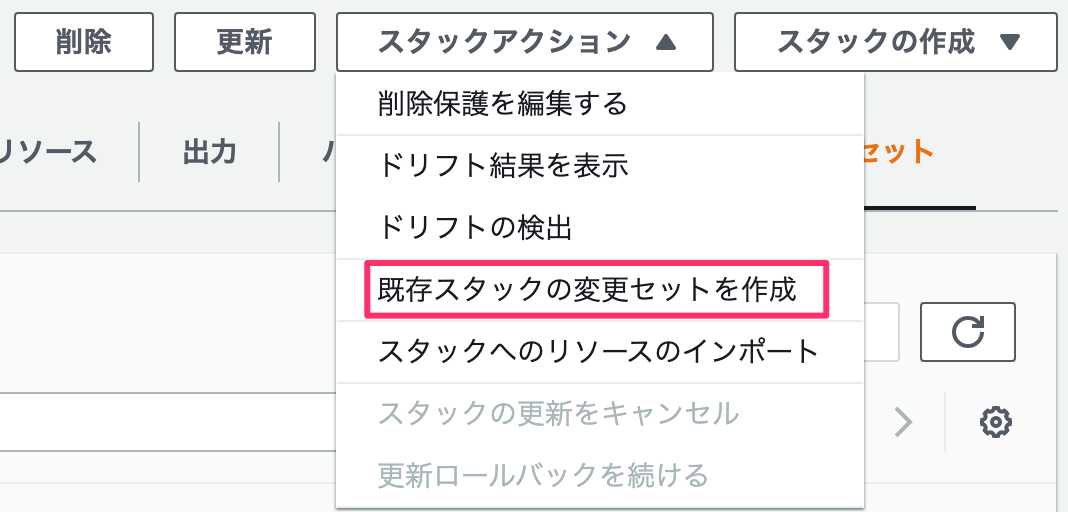
マネジメントコンソールでは 既存スタックの変更セットを作成 を実行します。
(直接)スタックを更新
- 直接スタックを更新する
- 変更セットのみ作成する場合は上述の
create-change-setを使用する
aws cloudformation update-stack \
    --stack-name example \
    --template-body file//($pwd)/template.yml \
    --change-set-name exampleChangeSet \
    --capabilities CAPABILITY_NAMED_IAM \
    --profile example
ref. https://docs.aws.amazon.com/AWSCloudFormation/latest/UserGuide/using-cfn-updating-stacks-direct.html
マネジメントコンソールからは↑の画像の 更新 を実行します。
テンプレートをチェック
$ aws cloudformation validate-template --template-body file:///path/to/template.yml --profile example
変更セットを取得
$ aws cloudformation describe-change-set --change-set-name --profile example
スタックの状態
リソース名を省略した場合
ほとんどのリソースは CloudFormation によって以下の規則で命名されます。
スタック名-論理ID-ランダムな文字列
公式ドキュメント
- AWS リソースおよびプロパティタイプのリファレンス
- https://docs.aws.amazon.com/en_us/AWSCloudFormation/latest/UserGuide/template-reference.html (テンプレートリファレンス 英語)
- https://docs.aws.amazon.com/AWSCloudFormation/latest/APIReference/Welcome.html (英語)
- Intrinsic function reference
- 組み込み関数リファレンス
- CodePipelineをCloudFormation(CodepipelineをCloudFormationで実行する
CloudFormationのドキュメント)- https://docs.aws.amazon.com/AWSCloudFormation/latest/UserGuide/continuous-delivery-codepipeline-basic-walkthrough.html
- CodePipelineをCloudFormation(CodepipelineをCloudFormationで実行する
CodePipelineのドキュメント)- https://docs.aws.amazon.com/ja_jp/codepipeline/latest/userguide/action-reference-CloudFormation.html
- https://docs.aws.amazon.com/codepipeline/latest/userguide/action-reference-CloudFormation.html
- https://docs.aws.amazon.com/ja_jp/codepipeline/latest/userguide/tutorials-cloudformation-action.html
- https://docs.aws.amazon.com/codepipeline/latest/userguide/tutorials-cloudformation-action.html
- https://docs.aws.amazon.com/code-samples/latest/catalog/code-catalog-cloudformation-codepipeline.html サンプル
Intrinsic 固有の、本質的な
参考記事
- 【CloudFormation入門】5分と6行で始めるAWS CloudFormationテンプレートによるインフラ構築
- AWS CLIでサービスの各種コマンドを動かしてみる(CloudFormation編)
- https://news.mynavi.jp/itsearch/article/cloud/4801
- CloudFormation の参照周りで意識すべきポイント・Tips
!Refの使い所